
1081 lines
52 KiB
Markdown
1081 lines
52 KiB
Markdown
<p align="center"><img src="public/images/favicon-no-bg.svg" width="80"></p>
|
||
<h1 align="center">BentoPDF</h1>
|
||
<p align="center">
|
||
<a href="https://www.digitalocean.com/?refcode=d93c189ef6d0&utm_campaign=Referral_Invite&utm_medium=Referral_Program&utm_source=badge">
|
||
<img src="https://web-platforms.sfo2.cdn.digitaloceanspaces.com/WWW/Badge%203.svg" alt="DigitalOcean Referral Badge">
|
||
</a>
|
||
</p>
|
||
|
||
**BentoPDF** is a powerful, privacy-first, client-side PDF toolkit that is self hostable and allows you to manipulate, edit, merge, and process PDF files directly in your browser. No server-side processing is required, ensuring your files remain secure and private.
|
||
|
||
[](https://github.com/alam00000/bentopdf/pkgs/container/bentopdf) [](https://ko-fi.com/alio01) 
|
||
[](https://github.com/sponsors/alam00000)
|
||
|
||

|
||
|
||
---
|
||
|
||
## Table of Contents
|
||
|
||
- [Join Us on Discord](#-join-us-on-discord)
|
||
- [Documentation](#-documentation)
|
||
- [Licensing](#-licensing)
|
||
- [Stargazers over time](#-stargazers-over-time)
|
||
- [Thank You to Our Sponsors](#-thank-you-to-our-sponsors)
|
||
- [Why BentoPDF?](#-why-bentopdf)
|
||
- [Features / Tools Supported](#️-features--tools-supported)
|
||
- [Organize & Manage PDFs](#organize--manage-pdfs)
|
||
- [Edit & Modify PDFs](#edit--modify-pdfs)
|
||
- [Convert to PDF](#convert-to-pdf)
|
||
- [Convert from PDF](#convert-from-pdf)
|
||
- [Secure & Optimize PDFs](#secure--optimize-pdfs)
|
||
- [Translations](#-translations)
|
||
- [Getting Started](#-getting-started)
|
||
- [Prerequisites](#prerequisites)
|
||
- [Quick Start](#-quick-start)
|
||
- [Static Hosting](#static-hosting-using-netlify-vercel-and-github-pages)
|
||
- [Self-Hosting Locally](#-self-hosting-locally)
|
||
- [Docker Compose / Podman Compose](#-run-with-docker-compose--podman-compose-recommended)
|
||
- [Podman Quadlet](#-podman-quadlet-systemd-integration)
|
||
- [Simple Mode](#-simple-mode-for-internal-use)
|
||
- [Custom Branding](#-custom-branding)
|
||
- [WASM Configuration](#wasm-configuration)
|
||
- [Air-Gapped / Offline Deployment](#air-gapped--offline-deployment)
|
||
- [Security Features](#-security-features)
|
||
- [Digital Signature CORS Proxy](#digital-signature-cors-proxy-required)
|
||
- [Version Management](#-version-management)
|
||
- [Development Setup](#-development-setup)
|
||
- [Tech Stack & Background](#️-tech-stack--background)
|
||
- [Roadmap](#️-roadmap)
|
||
- [Contributing](#-contributing)
|
||
- [Special Thanks](#special-thanks)
|
||
|
||
---
|
||
|
||
## 📢 Join Us on Discord
|
||
|
||
[](https://discord.gg/Bgq3Ay3f2w)
|
||
|
||
Have questions, feature requests, or want to chat with the community? Join our Discord server!
|
||
|
||
---
|
||
|
||
## 📚 Documentation
|
||
|
||
[](https://bentopdf.com/docs/)
|
||
|
||
Visit our [Documentation](https://bentopdf.com/docs/) for:
|
||
|
||
- **Getting Started** guide
|
||
- **Tools Reference** (50+ tools)
|
||
- **Self-Hosting** guides (Docker, Vercel, Netlify, Cloudflare, AWS, Hostinger, Nginx, Apache)
|
||
- **Contributing** guide
|
||
- **Commercial License** details
|
||
|
||
---
|
||
|
||
## 📜 Licensing
|
||
|
||
BentoPDF is **dual-licensed** to fit your needs:
|
||
|
||
| License | Best For | Price |
|
||
| -------------- | -------------------------------------------- | ------------------ |
|
||
| **AGPL-3.0** | Open-source projects with public source code | **Free** |
|
||
| **Commercial** | Proprietary / closed-source applications | **$49** (lifetime) |
|
||
|
||
<p align="center">
|
||
<a href="https://buy.polar.sh/polar_cl_ThDfffbl733x7oAodcIryCzhlO57ZtcWPq6HJ1qMChd">
|
||
<img src="https://img.shields.io/badge/🚀_Get_Commercial_License-$49_Lifetime-6366f1?style=for-the-badge&labelColor=1f2937" alt="Get Commercial License">
|
||
</a>
|
||
</p>
|
||
|
||
> **One-time purchase** · **Unlimited devices & users** · **Lifetime updates** · **No AGPL obligations**
|
||
|
||
📖 For more details, see our [Licensing Page](https://bentopdf.com/licensing.html)
|
||
|
||
### AGPL Components (Pre-configured via CDN)
|
||
|
||
BentoPDF does **not** bundle AGPL-licensed processing libraries in its source code, but **pre-configures CDN URLs** so all features work out of the box with zero setup:
|
||
|
||
| Component | License | Features Enabled |
|
||
| ---------------------- | -------- | --------------------------------------------------------------------------------------------------- |
|
||
| **PyMuPDF** | AGPL-3.0 | PDF to Text/Markdown/SVG/DOCX, Extract Images/Tables, EPUB/MOBI/XPS conversion, Compression, Deskew |
|
||
| **Ghostscript** | AGPL-3.0 | PDF/A Conversion, Font to Outline |
|
||
| **CoherentPDF (CPDF)** | AGPL-3.0 | Merge, Split by Bookmarks, Table of Contents, PDF to/from JSON, Attachments |
|
||
|
||
> [!TIP]
|
||
> **Zero-config by default.** WASM modules are loaded at runtime from jsDelivr CDN. No manual configuration is needed. For custom deployments (air-gapped, self-hosted), see [WASM Configuration](#wasm-configuration) below.
|
||
|
||
<hr>
|
||
|
||
## ⭐ Stargazers over time
|
||
|
||
[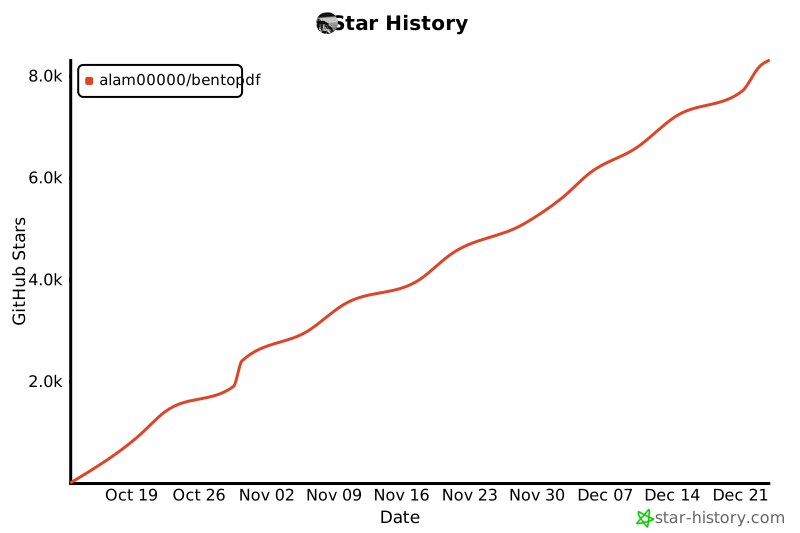](https://star-history.com/#alam00000/bentopdf&Date)
|
||
|
||
---
|
||
|
||
## 💖 Thank You to Our Sponsors
|
||
|
||
We're incredibly grateful to all our sponsors and supporters who help keep BentoPDF free and open source!
|
||
|
||
[](https://github.com/sponsors/alam00000)
|
||
[](https://ko-fi.com/alio01)
|
||
|
||
<!-- sponsors -->
|
||
<!-- sponsors -->
|
||
|
||
---
|
||
|
||
## ✨ Why BentoPDF?
|
||
|
||
- **Privacy First**: All processing happens in your browser. Your files are never uploaded to a server, guaranteeing 100% privacy.
|
||
- **No Limits**: Manipulate as many files as you want, as often you want. There are no restrictions or upload limits.
|
||
- **High Performance**: Built with modern web technologies, BentoPDF is fast and efficient, handling even large PDF files with ease.
|
||
- **Completely Free**: BentoPDF is a free and open-source tool for everyone.
|
||
|
||
---
|
||
|
||
## 🛠️ Features / Tools Supported
|
||
|
||
BentoPDF offers a comprehensive suite of tools to handle all your PDF needs.
|
||
|
||
### Organize & Manage PDFs
|
||
|
||
| Tool Name | Description |
|
||
| :--------------------------- | :------------------------------------------------------------------------------------------------------ |
|
||
| **Merge PDFs** | Combine multiple PDF files into one. Preserves Bookmarks. |
|
||
| **Split PDFs** | Extract specific pages or divide a document into smaller files. |
|
||
| **Organize Pages** | Reorder, duplicate, or delete pages with a simple drag-and-drop interface. |
|
||
| **Extract Pages** | Save a specific range of pages as a new PDF. |
|
||
| **Delete Pages** | Remove unwanted pages from your document. |
|
||
| **Rotate PDF** | Rotate individual or all pages in a document. |
|
||
| **Rotate by Custom Degrees** | Rotate pages by any custom angle. |
|
||
| **N-Up PDF** | Combine multiple pages onto a single page. |
|
||
| **View PDF** | A powerful, integrated PDF viewer. |
|
||
| **Alternate & Mix Pages** | Merge pages by alternating pages from each PDF. Preserves Bookmarks. |
|
||
| **Posterize PDF** | Split a PDF into multiple smaller pages for print. |
|
||
| **PDF Multi Tool** | Merge, Split, Organize, Delete, Rotate, Add Blank Pages, Extract and Duplicate in an unified interface. |
|
||
| **PDF Booklet** | Rearrange pages for double-sided booklet printing. Fold and staple to create a booklet. |
|
||
| **Add Attachments** | Embed one or more files into your PDF. |
|
||
| **Extract Attachments** | Extract all embedded files from PDF(s) as a ZIP. |
|
||
| **Edit Attachments** | View or remove attachments in your PDF. |
|
||
| **Divide Pages** | Divide pages horizontally or vertically. |
|
||
| **Combine to Single Page** | Stitch all pages into one continuous scroll. |
|
||
| **Add Blank Page** | Insert an empty page anywhere in your PDF. |
|
||
| **Reverse Pages** | Flip the order of all pages in your document. |
|
||
| **View Metadata** | Inspect the hidden properties of your PDF. |
|
||
| **PDFs to ZIP** | Package multiple PDF files into a ZIP archive. |
|
||
| **Compare PDFs** | Compare two PDFs side by side. |
|
||
|
||
### Edit & Modify PDFs
|
||
|
||
| Tool Name | Description |
|
||
| :------------------------ | :---------------------------------------------------------------------------------------------------------------------------------------------------------------------------------------------- |
|
||
| **PDF Editor** | Annotate, highlight, redact, comment, add shapes/images, search, and view PDFs. |
|
||
| **Create Fillable Forms** | Create professional fillable PDF forms with text fields, checkboxes, dropdowns, radio buttons, signatures, and more. Fully compliant with PDF standards for compatibility with all PDF viewers. |
|
||
| **PDF Form Filler** | Fill in forms directly in the browser. Also supports XFA forms. |
|
||
| **Add Page Numbers** | Easily add page numbers with customizable formatting. |
|
||
| **Add Watermark** | Add text or image watermarks to protect your documents. |
|
||
| **Header & Footer** | Add customizable headers and footers. |
|
||
| **Crop PDF** | Crop specific pages or the entire document. |
|
||
| **Deskew PDF** | Automatically straighten tilted scanned pages using OpenCV. |
|
||
| **Font to Outline** | Convert all fonts to vector outlines for consistent rendering across all devices. |
|
||
| **Invert Colors** | Invert the colors of your PDF pages for better readability. |
|
||
| **Change Background** | Modify the background color of your PDF. |
|
||
| **Change Text Color** | Change the color of text content within the PDF. |
|
||
| **Flatten PDF** | Flatten form fields and annotations into static content. |
|
||
| **Remove Annotations** | Remove comments, highlights, and other annotations. |
|
||
| **Remove Blank Pages** | Auto detect and remove blank pages in a PDF. |
|
||
| **Edit Bookmarks** | Add, Edit, Create, Import and Export PDF Bookmarks. |
|
||
| **Add Stamps** | Add image stamps to your PDF using the annotation toolbar. |
|
||
| **Table of Contents** | Generate a table of contents page from PDF bookmarks. |
|
||
| **Redact Content** | Permanently remove sensitive content from your PDFs. |
|
||
|
||
### Convert to PDF
|
||
|
||
| Tool Name | Description |
|
||
| :-------------------- | :----------------------------------------------------------------------------------------------------- |
|
||
| **Image to PDF** | Convert JPG, PNG, BMP, GIF, TIFF, PNM, PGM, PBM, PPM, PAM, JXR, JPX, JP2, PSD, SVG, HEIC, WebP to PDF. |
|
||
| **JPG to PDF** | Convert JPG, JPEG, and JPEG2000 (JP2/JPX) images to PDF. |
|
||
| **PNG to PDF** | Convert PNG images to PDF. |
|
||
| **WebP to PDF** | Convert WebP images to PDF. |
|
||
| **SVG to PDF** | Convert SVG images to PDF. |
|
||
| **BMP to PDF** | Convert BMP images to PDF. |
|
||
| **HEIC to PDF** | Convert HEIC images to PDF. |
|
||
| **TIFF to PDF** | Convert TIFF images to PDF. |
|
||
| **PSD to PDF** | Convert Adobe Photoshop (PSD) files to PDF. |
|
||
| **Word to PDF** | Convert Word documents (DOCX, DOC, ODT, RTF) to PDF. |
|
||
| **Excel to PDF** | Convert Excel spreadsheets (XLSX, XLS, ODS, CSV) to PDF. |
|
||
| **PowerPoint to PDF** | Convert PowerPoint presentations (PPTX, PPT, ODP) to PDF. |
|
||
| **ODT to PDF** | Convert OpenDocument Text files to PDF. |
|
||
| **ODS to PDF** | Convert OpenDocument Spreadsheet (ODS) files to PDF. |
|
||
| **ODP to PDF** | Convert OpenDocument Presentation (ODP) files to PDF. |
|
||
| **ODG to PDF** | Convert OpenDocument Graphics (ODG) files to PDF. |
|
||
| **RTF to PDF** | Convert Rich Text Format documents to PDF. |
|
||
| **CSV to PDF** | Convert CSV spreadsheet files to PDF. |
|
||
| **Markdown to PDF** | Write or paste Markdown and export it as a beautifully formatted PDF. |
|
||
| **Text to PDF** | Convert plain text files into a PDF. |
|
||
| **JSON to PDF** | Convert JSON files to PDF. |
|
||
| **XML to PDF** | Convert XML documents to PDF. |
|
||
| **EPUB to PDF** | Convert EPUB e-books to PDF. |
|
||
| **MOBI to PDF** | Convert MOBI e-books to PDF. |
|
||
| **FB2 to PDF** | Convert FictionBook (FB2) e-books to PDF. |
|
||
| **CBZ to PDF** | Convert comic book archives (CBZ/CBR) to PDF. |
|
||
| **XPS to PDF** | Convert XPS/OXPS documents to PDF. |
|
||
| **Email to PDF** | Convert email files (EML, MSG) to PDF. Supports Outlook exports. |
|
||
| **Pages to PDF** | Convert Apple Pages documents to PDF. |
|
||
| **WPD to PDF** | Convert WordPerfect documents (WPD) to PDF. |
|
||
| **WPS to PDF** | Convert WPS Office documents to PDF. |
|
||
| **PUB to PDF** | Convert Microsoft Publisher (PUB) files to PDF. |
|
||
| **VSD to PDF** | Convert Microsoft Visio (VSD, VSDX) files to PDF. |
|
||
|
||
### Convert from PDF
|
||
|
||
| Tool Name | Description |
|
||
| :------------------- | :----------------------------------------------------------------------------- |
|
||
| **PDF to Image** | Convert PDF pages to JPG, PNG, WebP, BMP, or TIFF formats. |
|
||
| **PDF to JPG** | Convert each PDF page into a JPG image. |
|
||
| **PDF to PNG** | Convert each PDF page into a PNG image. |
|
||
| **PDF to WebP** | Convert each PDF page into a WebP image. |
|
||
| **PDF to BMP** | Convert each PDF page into a BMP image. |
|
||
| **PDF to TIFF** | Convert each PDF page into a TIFF image. |
|
||
| **PDF to SVG** | Convert each page into a scalable vector graphic (SVG) for perfect quality. |
|
||
| **PDF to Greyscale** | Convert a color PDF into a black-and-white version. |
|
||
| **PDF to Text** | Extract text from PDF files and save as plain text (.txt). |
|
||
| **PDF to JSON** | Convert PDF files to JSON format. |
|
||
| **PDF to CSV** | Extract tables from PDF and convert to CSV format. |
|
||
| **PDF to Excel** | Extract tables from PDF and convert to Excel (XLSX) format. |
|
||
| **Extract Tables** | Extract tables from PDF files and export as CSV, JSON, or Markdown. |
|
||
| **OCR PDF** | Make scanned PDFs searchable and copyable using Optical Character Recognition. |
|
||
|
||
### Secure & Optimize PDFs
|
||
|
||
| Tool Name | Description |
|
||
| :---------------------- | :--------------------------------------------------------------------------------------------------------- |
|
||
| **Compress PDF** | Reduce file size while maintaining quality. |
|
||
| **Repair PDF** | Attempt to repair and recover data from a corrupted PDF. |
|
||
| **Encrypt PDF** | Add a password to protect your PDF from unauthorized access. |
|
||
| **Decrypt PDF** | Remove password protection from a PDF (password required). |
|
||
| **Change Permissions** | Set or modify user permissions for printing, copying, and editing. |
|
||
| **Sign PDF** | Draw, type, or upload your signature. |
|
||
| **Digital Signature** | Add cryptographic digital signatures using X.509 certificates (PFX/PEM). Private key never leaves browser. |
|
||
| **Validate Signature** | Verify digital signatures, check certificate validity, and confirm document integrity. |
|
||
| **Redact Content** | Permanently remove sensitive content from your PDFs. |
|
||
| **Edit Metadata** | View and modify PDF metadata (author, title, keywords, etc.). |
|
||
| **Remove Metadata** | Strip all metadata from your PDF for privacy. |
|
||
| **Linearize PDF** | Optimize PDF for fast web viewing. |
|
||
| **Sanitize PDF** | Remove metadata, annotations, scripts, and more. |
|
||
| **Fix Page Size** | Standardize all pages to a uniform size. |
|
||
| **Page Dimensions** | Analyze page size, orientation, and units. |
|
||
| **Remove Restrictions** | Remove password protection and security restrictions associated with digitally signed PDF files. |
|
||
|
||
---
|
||
|
||
## 🌍 Translations
|
||
|
||
BentoPDF is available in multiple languages:
|
||
|
||
| Language | Status |
|
||
| ------------------- | ------------------------------------------------------------------------------------------------------------------------- |
|
||
| English | [](public/locales/en/common.json) |
|
||
| Chinese | [](public/locales/zh/common.json) |
|
||
| Traditional Chinese | [](public/locales/zh-TW/common.json) |
|
||
| French | [](public/locales/fr/common.json) |
|
||
| German | [](public/locales/de/common.json) |
|
||
| Indonesian | [](public/locales/id/common.json) |
|
||
| Italian | [](public/locales/it/common.json) |
|
||
| Portuguese | [](public/locales/pt/common.json) |
|
||
| Turkish | [](public/locales/tr/common.json) |
|
||
| Vietnamese | [](public/locales/vi/common.json) |
|
||
|
||
Want to help translate BentoPDF into your language? Check out our [Translation Guide](TRANSLATION.md)!
|
||
|
||
---
|
||
|
||
## 🚀 Getting Started
|
||
|
||
You can run BentoPDF locally for development or personal use.
|
||
|
||
### Prerequisites
|
||
|
||
- [Node.js](https://nodejs.org/) (v18 or higher recommended)
|
||
- [npm](https://www.npmjs.com/) (or yarn/pnpm)
|
||
- [Docker](https://www.docker.com/) & [Docker Compose](https://docs.docker.com/compose/install/) (for containerized setup)
|
||
|
||
### 🚀 Quick Start
|
||
|
||
Run BentoPDF instantly from GitHub Container Registry (Recommended):
|
||
|
||
```bash
|
||
docker run -p 3000:8080 ghcr.io/alam00000/bentopdf:latest
|
||
```
|
||
|
||
Open your browser at: http://localhost:3000
|
||
|
||
<details>
|
||
<summary><b>Alternative: Using Docker Hub or Podman</b></summary>
|
||
|
||
**Docker Hub:**
|
||
|
||
```bash
|
||
docker run -p 3000:8080 bentopdfteam/bentopdf:latest
|
||
```
|
||
|
||
**Podman (GHCR):**
|
||
|
||
```bash
|
||
podman run -p 3000:8080 ghcr.io/alam00000/bentopdf:latest
|
||
```
|
||
|
||
**Podman (Docker Hub):**
|
||
|
||
```bash
|
||
podman run -p 3000:8080 docker.io/bentopdfteam/bentopdf:latest
|
||
```
|
||
|
||
> [!NOTE]
|
||
> All `docker` commands in this documentation work with Podman by replacing `docker` with `podman`.
|
||
|
||
</details>
|
||
|
||
### Static Hosting using Netlify, Vercel, and GitHub Pages
|
||
|
||
It is very straightforward to host your own instance of BentoPDF using a static web page hosting service. Plus, services such as Netlify, Vercel, and GitHub Pages all offer a free tier for getting started. See [Static Hosting](https://github.com/alam00000/bentopdf/blob/main/STATIC-HOSTING.md) for details.
|
||
|
||
### 🏠 Self-Hosting Locally
|
||
|
||
Since BentoPDF is fully client-side, all processing happens in the user's browser and no server-side processing is required. This means you can host BentoPDF as simple static files on any web server or hosting platform.
|
||
|
||
**Download from Releases (Recommended):**
|
||
|
||
The easiest way to self-host is to download the pre-built distribution file from our [GitHub releases](https://github.com/alam00000/bentopdf/releases). Each release includes a `dist-{version}.zip` file that contains all necessary files for self-hosting.
|
||
|
||
1. Go to [BentoPDF Releases](https://github.com/alam00000/bentopdf/releases)
|
||
2. Download the latest `dist-{version}.zip` file
|
||
3. Extract the zip file
|
||
4. Serve the extracted folder with your preferred web server
|
||
|
||
**Serve the extracted folder (requires Node.js):**
|
||
|
||
```bash
|
||
# Navigate to the extracted folder
|
||
cd dist-1.7.3 # Replace with your version
|
||
|
||
# Start a local server
|
||
npx http-server -c-1
|
||
```
|
||
|
||
The website will be accessible at: `http://localhost:8080/`
|
||
|
||
> [!NOTE]
|
||
> The `-c-1` flag disables caching for development.
|
||
|
||
**Build from Source (Advanced):**
|
||
|
||
If you prefer to build from source:
|
||
|
||
```bash
|
||
# Clone the repository
|
||
git clone https://github.com/alam00000/bentopdf.git
|
||
cd bentopdf
|
||
|
||
# Install dependencies
|
||
npm install
|
||
|
||
# Build the project
|
||
npm run build
|
||
|
||
# Package the distribution for hosting (optional)
|
||
npm run package
|
||
|
||
# Preview the build locally
|
||
npm run preview
|
||
|
||
# The website will be accessible at: http://localhost:4173/
|
||
|
||
```
|
||
|
||
**Compression Modes:**
|
||
|
||
BentoPDF supports different compression modes for optimized builds:
|
||
|
||
```bash
|
||
# Gzip only (smallest Docker image size)
|
||
npm run build:gzip
|
||
docker build --build-arg COMPRESSION_MODE=g -t bentopdf:gzip .
|
||
|
||
# Brotli only (best compression ratio)
|
||
npm run build:brotli
|
||
docker build --build-arg COMPRESSION_MODE=b -t bentopdf:brotli .
|
||
|
||
# No compression (fastest build time)
|
||
npm run build:original
|
||
docker build --build-arg COMPRESSION_MODE=o -t bentopdf:original .
|
||
|
||
# All formats (default, maximum browser compatibility)
|
||
npm run build:all
|
||
docker build --build-arg COMPRESSION_MODE=all -t bentopdf:all .
|
||
```
|
||
|
||
| Mode | Files Kept | Use Case |
|
||
| ----- | ----------- | --------------------------------- |
|
||
| `g` | `.gz` only | Standard nginx or minimal size |
|
||
| `b` | `.br` only | Modern CDN with Brotli support |
|
||
| `o` | originals | Development or custom compression |
|
||
| `all` | all formats | Maximum compatibility (default) |
|
||
|
||
**CDN Optimization:**
|
||
|
||
BentoPDF can use jsDelivr CDN to serve large WASM files (LibreOffice, Ghostscript, PyMuPDF) for improved performance and reduced bandwidth costs:
|
||
|
||
```bash
|
||
# Production build with CDN (Recommended)
|
||
VITE_USE_CDN=true npm run build
|
||
|
||
# Standard build with local files only
|
||
npm run build
|
||
```
|
||
|
||
**How it works:**
|
||
|
||
- When `VITE_USE_CDN=true`: Browser loads WASM files from jsDelivr CDN (fast, global delivery)
|
||
- Local files are **always included** as automatic fallback
|
||
- If CDN fails then it falls back to local files
|
||
|
||
<h3 id="wasm-configuration">⚙️ WASM Configuration</h3>
|
||
|
||
Advanced PDF features (PyMuPDF, Ghostscript, CoherentPDF) are pre-configured to load from jsDelivr CDN via environment variables. This means **all features work out of the box** — no manual setup needed.
|
||
|
||
The default URLs are set in `.env.production`:
|
||
|
||
```bash
|
||
VITE_WASM_PYMUPDF_URL=https://cdn.jsdelivr.net/npm/@bentopdf/pymupdf-wasm@0.11.14/
|
||
VITE_WASM_GS_URL=https://cdn.jsdelivr.net/npm/@bentopdf/gs-wasm/assets/
|
||
VITE_WASM_CPDF_URL=https://cdn.jsdelivr.net/npm/coherentpdf/dist/
|
||
```
|
||
|
||
To override via Docker build args:
|
||
|
||
```bash
|
||
docker build \
|
||
--build-arg VITE_WASM_PYMUPDF_URL=https://your-server.com/pymupdf/ \
|
||
--build-arg VITE_WASM_GS_URL=https://your-server.com/gs/ \
|
||
--build-arg VITE_WASM_CPDF_URL=https://your-server.com/cpdf/ \
|
||
-t bentopdf .
|
||
```
|
||
|
||
To disable a module (require manual user config via Advanced Settings), set its variable to an empty string.
|
||
|
||
Users can also override these defaults per-browser via **Advanced Settings** in the UI — user overrides take priority over the environment defaults.
|
||
|
||
> [!IMPORTANT]
|
||
> These URLs are baked into the JavaScript at **build time**. The WASM files themselves are downloaded by the **user's browser** at runtime — Docker does not download them during the build.
|
||
|
||
<h3 id="air-gapped--offline-deployment">🔒 Air-Gapped / Offline Deployment</h3>
|
||
|
||
For networks with no internet access (government, healthcare, financial, etc.), you need to prepare everything on a machine **with** internet, then transfer the bundle into the isolated network.
|
||
|
||
#### Automated Script (Recommended)
|
||
|
||
The included `prepare-airgap.sh` script automates the entire process — downloading WASM packages, building the Docker image, exporting everything into a self-contained bundle with a setup script.
|
||
|
||
```bash
|
||
git clone https://github.com/alam00000/bentopdf.git
|
||
cd bentopdf
|
||
|
||
# Interactive mode — prompts for all options
|
||
bash scripts/prepare-airgap.sh
|
||
|
||
# Or fully automated
|
||
bash scripts/prepare-airgap.sh --wasm-base-url https://internal.example.com/wasm
|
||
```
|
||
|
||
This produces a bundle directory containing:
|
||
|
||
```
|
||
bentopdf-airgap-bundle/
|
||
bentopdf.tar # Docker image
|
||
*.tgz # WASM packages (PyMuPDF, Ghostscript, CoherentPDF)
|
||
setup.sh # Setup script for the air-gapped side
|
||
README.md # Instructions
|
||
```
|
||
|
||
**Transfer the bundle** into the air-gapped network via USB, internal artifact repo, or approved method. Then run the included setup script:
|
||
|
||
```bash
|
||
cd bentopdf-airgap-bundle
|
||
bash setup.sh
|
||
```
|
||
|
||
The setup script loads the Docker image, extracts WASM files, and optionally starts the container.
|
||
|
||
<details>
|
||
<summary><strong>Script options</strong></summary>
|
||
|
||
| Flag | Description | Default |
|
||
| ----------------------- | ------------------------------------------------ | --------------------------------- |
|
||
| `--wasm-base-url <url>` | Where WASMs will be hosted internally | _(required, prompted if missing)_ |
|
||
| `--image-name <name>` | Docker image tag | `bentopdf` |
|
||
| `--output-dir <path>` | Output bundle directory | `./bentopdf-airgap-bundle` |
|
||
| `--simple-mode` | Enable Simple Mode | off |
|
||
| `--base-url <path>` | Subdirectory base URL (e.g. `/pdf/`) | `/` |
|
||
| `--language <code>` | Default UI language (e.g. `fr`, `de`) | _(none)_ |
|
||
| `--brand-name <name>` | Custom brand name | _(none)_ |
|
||
| `--brand-logo <path>` | Logo path relative to `public/` | _(none)_ |
|
||
| `--footer-text <text>` | Custom footer text | _(none)_ |
|
||
| `--dockerfile <path>` | Dockerfile to use | `Dockerfile` |
|
||
| `--skip-docker` | Skip Docker build and export | off |
|
||
| `--skip-wasm` | Skip WASM download (reuse existing `.tgz` files) | off |
|
||
|
||
</details>
|
||
|
||
> [!IMPORTANT]
|
||
> WASM files must be served from the **same origin** as the BentoPDF app. Web Workers use `importScripts()` which cannot load scripts cross-origin. For example, if BentoPDF runs at `https://internal.example.com`, the WASM base URL should also be `https://internal.example.com/wasm`.
|
||
|
||
#### Manual Steps
|
||
|
||
<details>
|
||
<summary>If you prefer to do it manually without the script</summary>
|
||
|
||
**Step 1: Download the WASM packages** (on a machine with internet)
|
||
|
||
```bash
|
||
npm pack @bentopdf/pymupdf-wasm@0.11.14
|
||
npm pack @bentopdf/gs-wasm
|
||
npm pack coherentpdf
|
||
```
|
||
|
||
**Step 2: Build the Docker image with internal URLs**
|
||
|
||
```bash
|
||
git clone https://github.com/alam00000/bentopdf.git
|
||
cd bentopdf
|
||
|
||
docker build \
|
||
--build-arg VITE_WASM_PYMUPDF_URL=https://internal-server.example.com/wasm/pymupdf/ \
|
||
--build-arg VITE_WASM_GS_URL=https://internal-server.example.com/wasm/gs/ \
|
||
--build-arg VITE_WASM_CPDF_URL=https://internal-server.example.com/wasm/cpdf/ \
|
||
-t bentopdf .
|
||
```
|
||
|
||
**Step 3: Export the Docker image**
|
||
|
||
```bash
|
||
docker save bentopdf -o bentopdf.tar
|
||
```
|
||
|
||
**Step 4: Transfer into the air-gapped network**
|
||
|
||
Copy these files via USB drive, internal artifact repository, or approved transfer method:
|
||
|
||
- `bentopdf.tar` — the Docker image
|
||
- `bentopdf-pymupdf-wasm-0.11.14.tgz` — PyMuPDF WASM package
|
||
- `bentopdf-gs-wasm-*.tgz` — Ghostscript WASM package
|
||
- `coherentpdf-*.tgz` — CoherentPDF WASM package
|
||
|
||
**Step 5: Set up inside the air-gapped network**
|
||
|
||
```bash
|
||
# Load the Docker image
|
||
docker load -i bentopdf.tar
|
||
|
||
# Extract the WASM packages
|
||
mkdir -p ./wasm/pymupdf ./wasm/gs ./wasm/cpdf
|
||
tar xzf bentopdf-pymupdf-wasm-0.11.14.tgz -C ./wasm/pymupdf --strip-components=1
|
||
tar xzf bentopdf-gs-wasm-*.tgz -C ./wasm/gs --strip-components=1
|
||
tar xzf coherentpdf-*.tgz -C ./wasm/cpdf --strip-components=1
|
||
|
||
# Run BentoPDF
|
||
docker run -d -p 3000:8080 --restart unless-stopped bentopdf
|
||
```
|
||
|
||
Make sure the WASM files are accessible at the URLs you configured in Step 2.
|
||
|
||
</details>
|
||
|
||
> [!NOTE]
|
||
> If you're building from source instead of Docker, set the variables in `.env.production` before running `npm run build`:
|
||
>
|
||
> ```bash
|
||
> VITE_WASM_PYMUPDF_URL=https://internal-server.example.com/wasm/pymupdf/
|
||
> VITE_WASM_GS_URL=https://internal-server.example.com/wasm/gs/
|
||
> VITE_WASM_CPDF_URL=https://internal-server.example.com/wasm/cpdf/
|
||
> ```
|
||
|
||
**Subdirectory Hosting:**
|
||
|
||
BentoPDF can also be hosted from a subdirectory (e.g., `example.com/tools/bentopdf/`):
|
||
|
||
```bash
|
||
|
||
# Example:
|
||
# 1. Build the app with the specific BASE_URL. BASE_URL must have a trailing and leading slash. The BASE_URL can be any url of your choice. Here we are using /tools/bentopdf/ as an example.
|
||
|
||
BASE_URL=/tools/bentopdf/ npm run build
|
||
|
||
# 2. Create the nested directory structure inside serve-test (or any folder of your choice for local testing. In case of production, create the nested directory structure inside the root directory)
|
||
mkdir -p serve-test/tools/bentopdf
|
||
|
||
# 3. Copy all files from the 'dist' folder into that nested directory
|
||
cp -r dist/* serve-test/tools/bentopdf/
|
||
|
||
# 4. Serve the 'serve-test' folder
|
||
npx serve serve-test
|
||
```
|
||
|
||
The website can be accessible at: `http://localhost:3000/tools/bentopdf/`
|
||
|
||
The `npm run package` command creates a `dist-{version}.zip` file that you can use for self-hosting.
|
||
|
||
**Docker Subdirectory Deployment:**
|
||
|
||
BentoPDF's Docker image also supports the `BASE_URL` build argument for subdirectory deployments:
|
||
|
||
```bash
|
||
# Build for subdirectory deployment
|
||
docker build --build-arg BASE_URL=/bentopdf/ -t bentopdf .
|
||
|
||
# Run the container
|
||
docker run -p 3000:8080 bentopdf
|
||
|
||
# The app will be accessible at http://localhost:3000/bentopdf/
|
||
```
|
||
|
||
**Default Language:**
|
||
|
||
Set the default UI language at build time. Users can still switch languages — this only changes the initial default. Supported: `en`, `ar`, `be`, `fr`, `de`, `es`, `zh`, `zh-TW`, `vi`, `tr`, `id`, `it`, `pt`, `nl`, `da`.
|
||
|
||
```bash
|
||
docker build --build-arg VITE_DEFAULT_LANGUAGE=fr -t bentopdf .
|
||
```
|
||
|
||
**Combined with Simple Mode:**
|
||
|
||
```bash
|
||
# Build with both BASE_URL and SIMPLE_MODE
|
||
docker build \
|
||
--build-arg BASE_URL=/tools/pdf/ \
|
||
--build-arg SIMPLE_MODE=true \
|
||
-t bentopdf-simple .
|
||
|
||
docker run -p 3000:8080 bentopdf-simple
|
||
```
|
||
|
||
> [!IMPORTANT]
|
||
>
|
||
> - Always include trailing slashes in `BASE_URL` (e.g., `/bentopdf/` not `/bentopdf`)
|
||
> - The default value is `/` for root deployment
|
||
|
||
### 🚀 Run with Docker Compose / Podman Compose (Recommended)
|
||
|
||
For a more robust setup with auto-restart capabilities:
|
||
|
||
1. **Download the repo and create a `docker-compose.yml` file or use the one given in repo**:
|
||
|
||
```yaml
|
||
services:
|
||
bentopdf:
|
||
image: ghcr.io/alam00000/bentopdf:latest # Recommended
|
||
# image: bentopdfteam/bentopdf:latest # Alternative: Docker Hub
|
||
container_name: bentopdf
|
||
ports:
|
||
- '3000:8080'
|
||
restart: unless-stopped
|
||
```
|
||
|
||
2. **Start the application**:
|
||
|
||
```bash
|
||
# Docker Compose
|
||
docker-compose up -d
|
||
|
||
# Podman Compose
|
||
podman-compose up -d
|
||
```
|
||
|
||
The application will be available at `http://localhost:3000`.
|
||
|
||
### 🐧 Podman Quadlet (Systemd Integration)
|
||
|
||
For Linux production deployments, you can run BentoPDF as a systemd service using [Podman Quadlet](https://docs.podman.io/en/latest/markdown/podman-systemd.unit.5.html).
|
||
|
||
Create `~/.config/containers/systemd/bentopdf.container`:
|
||
|
||
```ini
|
||
[Unit]
|
||
Description=BentoPDF - Privacy-first PDF toolkit
|
||
After=network-online.target
|
||
|
||
[Container]
|
||
Image=ghcr.io/alam00000/bentopdf:latest
|
||
ContainerName=bentopdf
|
||
PublishPort=3000:8080
|
||
AutoUpdate=registry
|
||
|
||
[Service]
|
||
Restart=always
|
||
|
||
[Install]
|
||
WantedBy=default.target
|
||
```
|
||
|
||
Then enable and start:
|
||
|
||
```bash
|
||
systemctl --user daemon-reload
|
||
systemctl --user enable --now bentopdf
|
||
```
|
||
|
||
For detailed Quadlet configuration, see [Self-Hosting Docker Guide](https://bentopdf.com/docs/self-hosting/docker).
|
||
|
||
### 🏢 Simple Mode for Internal Use
|
||
|
||
For organizations that want a clean, distraction-free interface focused solely on PDF tools, BentoPDF supports a **Simple Mode** that hides all branding and marketing content.
|
||
|
||
**What Simple Mode does:**
|
||
|
||
- Hides navigation, hero section, features, FAQ, testimonials, and footer
|
||
- Shows only the essential PDF tools
|
||
- Updates page title to "PDF Tools"
|
||
- Perfect for internal company tools and educational institutions
|
||
|
||
For more details, see [SIMPLE_MODE.md](SIMPLE_MODE.md).
|
||
|
||
### 🎨 Custom Branding
|
||
|
||
Replace the default BentoPDF logo, name, and footer text with your own. Branding is configured via environment variables at **build time** and works across all deployment methods (Docker, static hosting, air-gapped VMs).
|
||
|
||
| Variable | Description | Default |
|
||
| ------------------ | --------------------------------------- | --------------------------------------- |
|
||
| `VITE_BRAND_NAME` | Brand name shown in header and footer | `BentoPDF` |
|
||
| `VITE_BRAND_LOGO` | Path to logo file relative to `public/` | `images/favicon-no-bg.svg` |
|
||
| `VITE_FOOTER_TEXT` | Custom footer/copyright text | `© 2026 BentoPDF. All rights reserved.` |
|
||
|
||
**Docker:**
|
||
|
||
```bash
|
||
docker build \
|
||
--build-arg VITE_BRAND_NAME="AcmePDF" \
|
||
--build-arg VITE_BRAND_LOGO="images/acme-logo.svg" \
|
||
--build-arg VITE_FOOTER_TEXT="© 2026 Acme Corp. Internal use only." \
|
||
-t acmepdf .
|
||
```
|
||
|
||
**Building from source:**
|
||
|
||
Place your logo in the `public/` folder, then build:
|
||
|
||
```bash
|
||
VITE_BRAND_NAME="AcmePDF" \
|
||
VITE_BRAND_LOGO="images/acme-logo.svg" \
|
||
VITE_FOOTER_TEXT="© 2026 Acme Corp. Internal use only." \
|
||
npm run build
|
||
```
|
||
|
||
Or set the values in `.env.production` before building.
|
||
|
||
> [!TIP]
|
||
> Branding works in both full mode and Simple Mode. You can combine it with other build-time options like `SIMPLE_MODE`, `BASE_URL`, and `VITE_DEFAULT_LANGUAGE`.
|
||
|
||
### 🔒 Security Features
|
||
|
||
BentoPDF runs as a non-root user using nginx-unprivileged for enhanced security:
|
||
|
||
- **Non-Root Execution**: Container runs with minimal privileges using nginx-unprivileged
|
||
- **Port 8080**: Uses high port number to avoid requiring root privileges
|
||
- **Security Best Practices**: Follows Principle of Least Privilege
|
||
|
||
#### Basic Usage
|
||
|
||
```bash
|
||
docker build -t bentopdf .
|
||
docker run -p 8080:8080 bentopdf
|
||
```
|
||
|
||
#### Custom User ID (PUID/PGID)
|
||
|
||
For environments that require running as a specific non-root user (e.g., NAS devices, Kubernetes with security contexts), use the non-root Dockerfile:
|
||
|
||
```bash
|
||
# Build the non-root image
|
||
docker build -f Dockerfile.nonroot -t bentopdf-nonroot .
|
||
|
||
# Run with custom UID/GID
|
||
docker run -d -p 3000:8080 -e PUID=1000 -e PGID=1000 bentopdf-nonroot
|
||
```
|
||
|
||
| Variable | Description | Default |
|
||
| -------- | ------------------ | ------- |
|
||
| `PUID` | User ID to run as | `1000` |
|
||
| `PGID` | Group ID to run as | `1000` |
|
||
|
||
> [!NOTE]
|
||
> The standard `Dockerfile` uses `nginx-unprivileged` (UID 101) and is recommended for most deployments. Use `Dockerfile.nonroot` only when you need a specific UID/GID.
|
||
|
||
For detailed security configuration, see [SECURITY.md](SECURITY.md).
|
||
|
||
### Digital Signature CORS Proxy (Required)
|
||
|
||
The **Digital Signature** tool uses a signing library that may need to fetch certificate chain data from certificate authority provider. Since many certificate servers don't include CORS headers, a proxy is required for this feature to work in the browser.
|
||
|
||
**When is the proxy needed?**
|
||
|
||
- Only when using the Digital Signature tool
|
||
- Only if your certificate requires fetching issuer certificates from external URLs
|
||
- Self-signed certificates typically don't need this
|
||
|
||
**Deploying the CORS Proxy (Cloudflare Workers):**
|
||
|
||
1. **Navigate to the cloudflare directory:**
|
||
|
||
```bash
|
||
cd cloudflare
|
||
```
|
||
|
||
2. **Login to Cloudflare (if not already):**
|
||
|
||
```bash
|
||
npx wrangler login
|
||
```
|
||
|
||
3. **Deploy the worker:**
|
||
|
||
```bash
|
||
npx wrangler deploy
|
||
```
|
||
|
||
4. **Note your worker URL** (e.g., `https://bentopdf-cors-proxy.your-subdomain.workers.dev`)
|
||
|
||
5. **Set the environment variable when building:**
|
||
```bash
|
||
VITE_CORS_PROXY_URL=https://your-worker-url.workers.dev npm run build
|
||
```
|
||
|
||
#### Production Security Features
|
||
|
||
The CORS proxy includes several security measures:
|
||
|
||
| Feature | Description |
|
||
| ----------------------- | ------------------------------------------------------------------------- |
|
||
| **URL Restrictions** | Only allows certificate URLs (`.crt`, `.cer`, `.pem`, `/certs/`, `/ocsp`) |
|
||
| **Private IP Blocking** | Blocks requests to localhost, 10.x, 192.168.x, 172.16-31.x |
|
||
| **File Size Limit** | Rejects files larger than 10MB |
|
||
| **Rate Limiting** | 60 requests per IP per minute (requires KV) |
|
||
| **HMAC Signatures** | Optional client-side signing (limited protection) |
|
||
|
||
#### Enabling Rate Limiting (Recommended)
|
||
|
||
Rate limiting requires Cloudflare KV storage:
|
||
|
||
```bash
|
||
cd cloudflare
|
||
|
||
# Create KV namespace
|
||
npx wrangler kv namespace create "RATE_LIMIT_KV"
|
||
|
||
# Copy the returned ID and add to wrangler.toml:
|
||
# [[kv_namespaces]]
|
||
# binding = "RATE_LIMIT_KV"
|
||
# id = "YOUR_ID_HERE"
|
||
|
||
# Redeploy
|
||
npx wrangler deploy
|
||
```
|
||
|
||
**Free tier limits:** 100,000 reads/day, 1,000 writes/day (~300-500 signatures/day)
|
||
|
||
#### HMAC Signature Verification (Optional)
|
||
|
||
> [!WARNING]
|
||
> Client-side secrets can be extracted from bundled JavaScript. For production deployments with sensitive requirements, use your own backend server to proxy requests instead of embedding secrets in frontend code.
|
||
|
||
BentoPDF uses client-side HMAC as a deterrent against casual abuse, but accepts this tradeoff due to its fully client-side architecture. To enable:
|
||
|
||
```bash
|
||
# Generate a secret
|
||
openssl rand -hex 32
|
||
|
||
# Set on Cloudflare Worker
|
||
npx wrangler secret put PROXY_SECRET
|
||
|
||
# Set in build environment
|
||
VITE_CORS_PROXY_SECRET=your-secret npm run build
|
||
```
|
||
|
||
### 📦 Version Management
|
||
|
||
BentoPDF supports semantic versioning with multiple container tags available:
|
||
|
||
**GitHub Container Registry (Recommended):**
|
||
|
||
- **Latest**: `ghcr.io/alam00000/bentopdf:latest`
|
||
- **Specific Version**: `ghcr.io/alam00000/bentopdf:1.0.0`
|
||
- **Version with Prefix**: `ghcr.io/alam00000/bentopdf:v1.0.0`
|
||
|
||
**Docker Hub:**
|
||
|
||
- **Latest**: `bentopdfteam/bentopdf:latest`
|
||
- **Specific Version**: `bentopdfteam/bentopdf:1.0.0`
|
||
- **Version with Prefix**: `bentopdfteam/bentopdf:v1.0.0`
|
||
|
||
#### Quick Release
|
||
|
||
```bash
|
||
# Release a patch version (0.0.1 → 0.0.2)
|
||
npm run release
|
||
|
||
# Release a minor version (0.0.1 → 0.1.0)
|
||
npm run release:minor
|
||
|
||
# Release a major version (0.0.1 → 1.0.0)
|
||
npm run release:major
|
||
```
|
||
|
||
For detailed release instructions, see [RELEASE.md](RELEASE.md).
|
||
|
||
### 🚀 Development Setup
|
||
|
||
#### Option 1: Run with npm
|
||
|
||
1. **Clone the Repository**:
|
||
|
||
```bash
|
||
git clone https://github.com/alam00000/bentopdf.git
|
||
cd bentopdf
|
||
```
|
||
|
||
2. **Install Dependencies**:
|
||
|
||
```bash
|
||
npm install
|
||
```
|
||
|
||
3. **Run the Development Server**:
|
||
```bash
|
||
npm run dev
|
||
```
|
||
The application will be available at `http://localhost:5173`.
|
||
|
||
#### Option 2: Build and Run with Docker Compose
|
||
|
||
1. **Clone the Repository**:
|
||
|
||
```bash
|
||
git clone https://github.com/alam00000/bentopdf.git
|
||
cd bentopdf
|
||
```
|
||
|
||
2. **Run with Docker Compose**:
|
||
|
||
```bash
|
||
docker-compose -f docker-compose.dev.yml up -d
|
||
```
|
||
|
||
The application will be available at `http://localhost:3000`.
|
||
|
||
> [!NOTE]
|
||
> After making any local changes to the code, rebuild the Docker image using:
|
||
|
||
```bash
|
||
docker-compose -f docker-compose.dev.yml up --build -d
|
||
```
|
||
|
||
This ensures your latest changes are applied inside the container.
|
||
|
||
---
|
||
|
||
## 🛠️ Tech Stack & Background
|
||
|
||
BentoPDF was originally built using **HTML**, **CSS**, and **vanilla JavaScript**. As the project grew, it was migrated to a modern stack for better maintainability and scalability:
|
||
|
||
- **Vite**: A fast build tool for modern web development.
|
||
- **TypeScript**: For type safety and an improved developer experience.
|
||
- **Tailwind CSS**: For rapid and consistent UI development.
|
||
|
||
> [!NOTE]
|
||
> Some parts of the codebase still use legacy structures from the original implementation. Contributors should expect gradual updates as testing and refactoring continue.
|
||
|
||
---
|
||
|
||
## 🗺️ Roadmap
|
||
|
||
### Planned Features:
|
||
|
||
- **HTML to PDF**: Convert HTML files or web pages into PDF documents.
|
||
- **Markdown to PDF**: Enhanced support for converting `.md` files to PDF.
|
||
- **Convert to PDF/A**: Convert PDFs to the PDF/A archival format.
|
||
- **Edit PDF Content**: Directly edit text and other content within your PDF.
|
||
- **PDF to Office**: Converts PDF files into editable Word, Excel, and PowerPoint formats.
|
||
- **Office to PDF**: Converts Word, Excel, and PowerPoint documents into optimized PDFs.
|
||
|
||
Contributions and discussions on the roadmap are welcome! Join the conversation via [Discord](https://discord.gg/Bgq3Ay3f2w).
|
||
|
||
---
|
||
|
||
## 🤝 Contributing
|
||
|
||
We welcome contributions from the community! Here's how you can get started:
|
||
|
||
1. **Fork the repository** and create your branch from `main`.
|
||
2. Follow the **Getting Started** steps to set up your local environment.
|
||
3. Make your changes and commit them with a clear message.
|
||
4. **Open a Pull Request** and describe the changes you've made.
|
||
|
||
Have an idea for a new tool or an improvement? [Open an issue](https://github.com/alam00000/bentopdf/issues) to discuss it first.
|
||
|
||
### 📖 Contributing to Documentation
|
||
|
||
Our documentation is built with [VitePress](https://vitepress.dev/). Here's how to contribute:
|
||
|
||
```bash
|
||
# Install dependencies
|
||
npm install
|
||
|
||
# Start docs dev server
|
||
npm run docs:dev
|
||
|
||
# Build docs for production
|
||
npm run docs:build
|
||
|
||
# Preview the built docs
|
||
npm run docs:preview
|
||
```
|
||
|
||
Documentation files are in the `docs/` folder:
|
||
|
||
- `docs/index.md` - Home page
|
||
- `docs/getting-started.md` - Getting started guide
|
||
- `docs/tools/` - Tools reference
|
||
- `docs/self-hosting/` - Self-hosting guides (Docker, Vercel, Netlify, Hostinger, etc.)
|
||
- `docs/contributing.md` - Contributing guide
|
||
- `docs/licensing.md` - Commercial license info
|
||
|
||
---
|
||
|
||
## Special Thanks
|
||
|
||
BentoPDF wouldn't be possible without the amazing open-source tools and libraries that power it. We'd like to extend our heartfelt thanks to the creators and maintainers of:
|
||
|
||
**Bundled Libraries:**
|
||
|
||
- **[PDFLib.js](https://pdf-lib.js.org/)** – For enabling powerful client-side PDF manipulation.
|
||
- **[PDF.js](https://mozilla.github.io/pdf.js/)** – For the robust PDF rendering engine in the browser.
|
||
- **[PDFKit](https://pdfkit.org/)** – For creating and editing PDFs with ease.
|
||
- **[EmbedPDF](https://github.com/embedpdf/embed-pdf-viewer)** – For seamless PDF editing in pure JS.
|
||
- **[Cropper.js](https://fengyuanchen.github.io/cropperjs/)** – For intuitive image cropping functionality.
|
||
- **[Vite](https://vitejs.dev/)** – For lightning-fast development and build tooling.
|
||
- **[Tailwind CSS](https://tailwindcss.com/)** – For rapid, flexible, and beautiful UI styling.
|
||
- **[qpdf](https://github.com/qpdf/qpdf)** and **[qpdf-wasm](https://github.com/neslinesli93/qpdf-wasm)** – For inspecting, repairing, and transforming PDF files.
|
||
- **[LibreOffice](https://www.libreoffice.org/)** – For powerful document conversion capabilities.
|
||
|
||
**AGPL Libraries (Pre-configured via CDN):**
|
||
|
||
- **[CoherentPDF (cpdf)](https://www.coherentpdf.com/)** – For content-preserving PDF operations. _(AGPL-3.0)_
|
||
- **[PyMuPDF](https://github.com/pymupdf/PyMuPDF)** – For high-performance PDF manipulation and data extraction. _(AGPL-3.0)_
|
||
- **[Ghostscript (GhostPDL)](https://github.com/ArtifexSoftware/ghostpdl)** – For PDF/A conversion and font outlining. _(AGPL-3.0)_
|
||
|
||
> [!NOTE]
|
||
> AGPL-licensed libraries are not bundled in BentoPDF's source code. They are loaded at runtime from CDN (pre-configured) and can be overridden via environment variables or Advanced Settings.
|
||
|
||
Your work inspires and empowers developers everywhere. Thank you for making open-source amazing!
|